
















































About Vegas Clash 3d
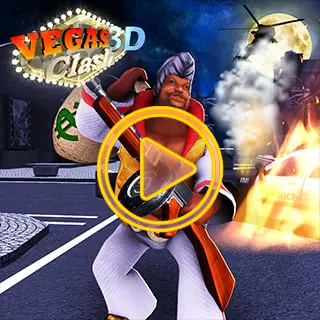
Vegas Clash 3d is an intense action-packed shooting game delivering responsive gunplay, tactical weapon handling, and fast reflexes across dynamic combat arenas. Face off against tough opponents, upgrade your arsenal, and secure victory. Play Vegas Clash 3d unblocked on Unblocked Games WTF with instant browser loading and zero downloads.
Why Choose Us for Vegas Clash 3d and Beyond?
In a digital landscape often cluttered with distractions, we stand out by offering a clean, efficient, and user-friendly gaming environment. Our commitment to providing unblocked games means you can access your favorite titles without encountering restrictions, making us the ideal choice for students, professionals, and anyone looking for a quick gaming fix. We pride ourselves on our extensive collection, which is constantly growing with new and exciting additions. Our platform is engineered for universal accessibility, ensuring that you can enjoy Vegas Clash 3d and countless other games on a variety of devices, including PCs, Chromebooks, and even mobile phones, with consistent performance and reliability.
Exploring the Thrills of Vegas Clash 3d
Vegas Clash 3d plunges you into the heart of a bustling, high-stakes environment where strategy, reflexes, and a bit of luck determine your success. This immersive 3D experience captures the essence of the iconic Las Vegas Strip, presenting players with a dynamic arena where competition is fierce and rewards can be substantial. Whether you're engaging in intense shootouts, strategic maneuvers, or simply navigating the vibrant cityscape, Vegas Clash 3d offers a captivating gameplay loop that keeps you on the edge of your seat. We provide direct access to this thrilling adventure, allowing you to experience its full glory without any interruptions. Prepare yourself for a visually engaging and action-packed encounter that truly embodies the spirit of competitive gaming in a dazzling, virtual metropolis.
How to Access and Play Vegas Clash 3d Instantly
Getting started with Vegas Clash 3d on our platform is as straightforward as it gets. We've streamlined the process to eliminate any friction between you and your gaming pleasure. Forget about creating accounts or navigating complex menus. Our approach is simple: click and play. Once you find Vegas Clash 3d within our extensive library, a single click is all it takes to load the game directly into your browser. We ensure that the game is optimized for quick loading times, so you spend less time waiting and more time immersed in the action. If you're ever having trouble locating a specific title, our organized directory structure and intuitive search functionality make it easy to find exactly what you're looking for. Dive into the excitement of Vegas Clash 3d and countless other titles with unparalleled ease.
General Game Controls for an Enhanced Experience
While each game, including Vegas Clash 3d, may have its unique control scheme tailored to its specific mechanics, understanding common input methods will significantly enhance your gaming experience across our entire library. We aim to provide an intuitive control experience for all our titles. Typically, movement is handled by the W, A, S, D keys or the Arrow Keys, allowing for fluid navigation and character control. Actions such as jumping, interacting with objects, or confirming selections are often mapped to the Spacebar. For games requiring aiming or precise targeting, the mouse is your primary tool, offering freeform control for shooting or menu navigation. Modifier keys like Shift or Ctrl are frequently used for actions such as sprinting or activating special abilities. Pausing the game is generally accessible via the Esc or P keys, allowing you to take breaks or strategize without losing your progress. Many games also provide on-screen prompts or in-game tutorials to guide you through their specific controls, ensuring you can quickly adapt and master the gameplay.
How to Play Vegas Clash 3d & Controls Guide
Mastering Vegas Clash 3d requires fast reflexes and precise control inputs. Below is the verified control reference for desktop and mobile players:
| Control Input | Action / Function |
|---|---|
WASD | Move character forward, left, backward, and right |
Mouse / Crosshair | Aim weapon and rotate field of view |
Left Click | Shoot / Primary attack |
Right Click | Aim down sights (ADS) / Zoom scope |
Spacebar | Jump / Mantle obstacles |
R | Reload ammunition clip |
1 - 5 Keys | Switch weapons and equipment |
Tips & Strategies to Win in Vegas Clash 3d
- Learn the Momentum: Take time in early rounds to understand movement physics and inertia in Vegas Clash 3d. Smooth, measured inputs beat erratic button mashing.
- Anticipate Upcoming Hazards: Keep your eyes focused slightly ahead of your character or vehicle to react early to sudden traps, turns, or enemy encounters.
- Practice Consistent Timing: Many challenges in Vegas Clash 3d rely on rhythmic timing. Replaying tricky stages builds muscle memory for flawless high-score runs.
- Optimize Display Settings: Use the fullscreen toggle button below the game frame to eliminate desktop distractions and maximize your reaction speed.
Frequently Asked Questions About Vegas Clash 3d
Can I play Vegas Clash 3d unblocked at school?
Yes, Vegas Clash 3d runs directly through HTML5/WebGL in modern web browsers (Chrome, Edge, Firefox, Safari) without requiring local admin rights, APK downloads, or third-party plugins.
Does Vegas Clash 3d work on school Chromebooks?
Yes, the game is lightweight and fully optimized for ChromeOS and budget laptops with fast asset streaming and low memory overhead.
How do I play in fullscreen mode?
Simply click the expand (fullscreen) icon located directly beneath the game canvas on this page to expand the view to 100% of your screen.