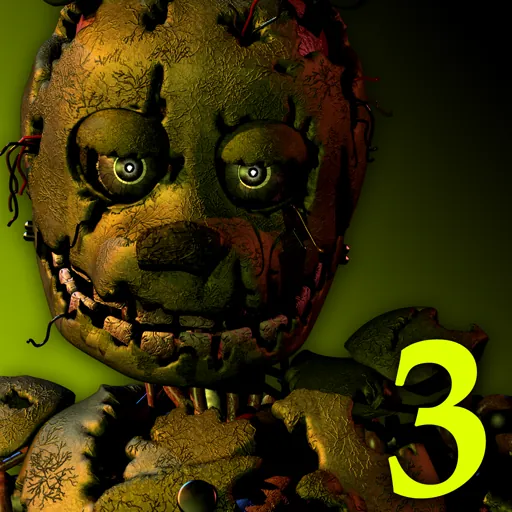





















































About Fnaf 3
Fnaf 3 is an exciting and addictive browser game delivering instant entertainment with intuitive mechanics, smooth animations, and progressive challenges. Master the gameplay loop, beat your personal records, and enjoy Fnaf 3 unblocked online on any device with no downloads required.
Exploring the Haunting World of Five Nights at Freddy's 3
Five Nights at Freddy's 3 represents a significant evolution within the beloved horror franchise. Moving away from the constant presence of multiple animatronics in the same room, this installment introduces a more psychological and atmospheric approach to fear. Players are thrust into the role of a night security guard tasked with overseeing a horror-themed attraction known as "Fazbear's Fright." This attraction aims to capitalize on the spooky lore surrounding the original Freddy Fazbear's Pizza, incorporating artifacts and props from the dilapidated restaurants of the past. However, the allure of nostalgia quickly gives way to genuine dread as a singular, persistent threat begins to stalk the player.
The Unique Mechanics of FNAF 3
Unlike its predecessors, FNAF 3 introduces a singular antagonist: Springtrap. This elusive animatronic, a combination of William Afton (the franchise's primary villain) and a Spring Bonnie suit, is the central figure of dread. Players must contend with Springtrap's movements and relentless pursuit while managing other environmental hazards that contribute to the escalating tension. The core gameplay loop revolves around monitoring camera feeds, sealing off vents to prevent entry, and using an audio lure system to distract Springtrap. This audio lure is crucial; by playing a distorted child's voice, players can attempt to guide Springtrap away from their office. Failure to do so will inevitably lead to a terrifying jump scare and the end of the night.
The Significance of Phantom Animatronics
Adding another layer of complexity and disorientation are the Phantom animatronics. These are not physical threats in the same vein as Springtrap but rather hallucinatory apparitions that appear on the player's monitor. Seeing a Phantom animatronic—such as Phantom Foxy, Phantom Chica, or Phantom Freddy—will temporarily disable specific systems, like the camera feed, audio system, or ventilation. Players must quickly reboot these systems to regain control and continue their defense. These phantoms serve to disrupt the player's concentration and create moments of panic, making the already difficult task of surviving the night even more challenging. Their appearance is often tied to specific camera views or actions, demanding constant vigilance and quick reactions.
Managing Limited Resources
Survival in FNAF 3 hinges on the efficient management of limited resources. The primary resources are the ventilation system and the power supply. The ventilation system can become faulty, causing visual disturbances and impairing the player's ability to see and react effectively. Regular maintenance is required to keep it running smoothly. Furthermore, the use of the audio lure consumes power, albeit in small increments. While power is less of a concern than in previous titles, it still needs to be monitored, especially in the later, more difficult nights. Every action the player takes—monitoring cameras, sealing vents, activating the audio lure, and rebooting systems—draws from these finite resources, creating a constant pressure to make the right decisions under duress.
How to Play Fnaf 3 & Controls Guide
Mastering Fnaf 3 requires fast reflexes and precise control inputs. Below is the verified control reference for desktop and mobile players:
| Control Input | Action / Function |
|---|---|
WASD / Arrow Keys | Primary movement and navigation |
Spacebar | Jump, interact, or primary action |
Left Click / Tap | Aim, fire, or select options |
Esc / P | Pause game menu |
Tips & Strategies to Win in Fnaf 3
- Learn the Momentum: Take time in early rounds to understand movement physics and inertia in Fnaf 3. Smooth, measured inputs beat erratic button mashing.
- Anticipate Upcoming Hazards: Keep your eyes focused slightly ahead of your character or vehicle to react early to sudden traps, turns, or enemy encounters.
- Practice Consistent Timing: Many challenges in Fnaf 3 rely on rhythmic timing. Replaying tricky stages builds muscle memory for flawless high-score runs.
- Optimize Display Settings: Use the fullscreen toggle button below the game frame to eliminate desktop distractions and maximize your reaction speed.
Frequently Asked Questions About Fnaf 3
Can I play Fnaf 3 unblocked at school?
Yes, Fnaf 3 runs directly through HTML5/WebGL in modern web browsers (Chrome, Edge, Firefox, Safari) without requiring local admin rights, APK downloads, or third-party plugins.
Does Fnaf 3 work on school Chromebooks?
Yes, the game is lightweight and fully optimized for ChromeOS and budget laptops with fast asset streaming and low memory overhead.
How do I play in fullscreen mode?
Simply click the expand (fullscreen) icon located directly beneath the game canvas on this page to expand the view to 100% of your screen.